Ruby on Rails
How to deploy Ruby on Rails on AwanCerah Web Hosting
Run a Rails app on AwanCerah Web Hosting with Setup Ruby App. Upload your code, run bundle install, set SECRET_KEY_BASE, prepare the database and assets, and the app runs on Puma with SSL.
With Setup Ruby App, Ruby on Rails apps keep running on AwanCerah Web Hosting with Puma. Gems are installed inside the app folder, and your domain or a path is routed to the app with SSL.
We tested the steps in this guide with a Rails 8.1 app created on another computer and then uploaded, until the scaffold pages and their assets loaded over HTTPS.
What you need
- Web Hosting on the Sedang plan or higher. Sedang includes 3 apps and Besar 5, shared across Node.js, Python, and Ruby. On the Mikro and Kecil plans, Setup Ruby App is shown locked.
- A domain that points to your hosting with SSL active. See the Web Hosting guide.
- A Rails app that runs on Ruby 3.2. Rails 7 and Rails 8 support this version. If your
Gemfilehas arubyline, make sure it allows 3.2.
Prepare the app before uploading
Production database paths. A Rails 8 app created without Kamal leaves the production database paths commented out. Fill them in config/database.yml so the databases live in the storage folder:
production:
  primary:
    <<: *default
    database: storage/production.sqlite3
  cache:
    <<: *default
    database: storage/production_cache.sqlite3
    migrations_paths: db/cache_migrate
  queue:
    <<: *default
    database: storage/production_queue.sqlite3
    migrations_paths: db/queue_migrate
  cable:
    <<: *default
    database: storage/production_cable.sqlite3
    migrations_paths: db/cable_migrate
Apps on a path other than /. If you will set a URL path, for example /blog, change config.ru like this. For the / URL path, the default config.ru is enough.
require_relative "config/environment"

map ENV.fetch("RAILS_RELATIVE_URL_ROOT", "/") do
  run Rails.application
end
Rails.application.load_server
Leave these out of the upload: vendor/bundle, node_modules, tmp, log, and config/master.key. Gems are installed again on the server, and secrets go into environment variables.
Bring in your code
- From Git. Open Terminal in the Advanced group, set the Working folder to
apps, and rungit clone https://github.com/your-account/blog.git blog. - Upload from your computer. Zip the project. In File Manager, open the
appsfolder, create ablogfolder, upload the .zip file into it, and extract it.
Bring the code in first, then create the app. A folder that is still empty when the app is created gets a sample Rack app.
Create the app
- On the hosting dashboard, open Setup Ruby App in the Software group.
- Click Create app and pick a Ruby Version.
- Set the App folder to your code's folder name, for example
blog. - Pick a Domain and fill in the URL path.
- Keep
config.ruas the Rackup file. - Click Create app.
The app cannot run yet because its gems are not installed. The app card may show Not running until the next steps are done.
Install gems, the database, and assets
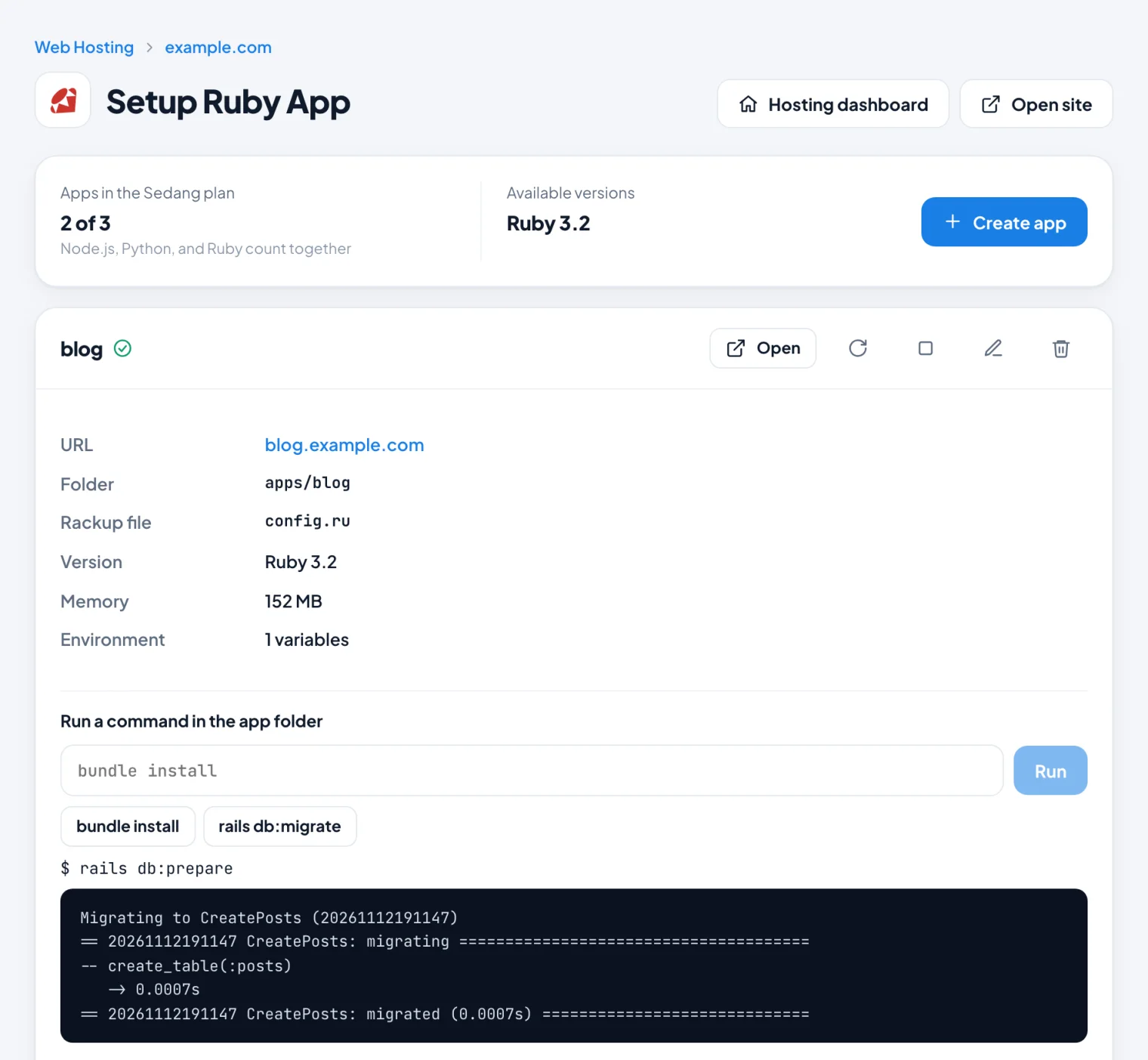
Run these commands one at a time in the Run a command in the app folder box on the app card.
- Click bundle install. Gems are installed in
vendor/bundleinside the app folder. In our test, a new Rails 8.1 app finished in about 4 minutes because some gems are compiled. - Run
rails secretand copy the long text it prints. - Click the Edit icon on the app card. Under Environment variables, add
SECRET_KEY_BASEwith that text, then save. - Run
rails db:prepareto create the databases and run the migrations. - Run
rails assets:precompile. - Click the Restart icon, then Open.
rails and rake run through bundle exec automatically. The other available commands are bundle, ruby, gem, and git. Commands run without interactive input and stop automatically after 15 minutes.
The message "Using vips to process variants requires the libvips library" is only a warning. Ignore it if your app does not create image variants with Active Storage.
Environment variables
The server already sets RAILS_ENV=production, RAILS_LOG_TO_STDOUT, and RAILS_SERVE_STATIC_FILES. Add your app's own values with the Edit icon, for example SECRET_KEY_BASE, or RAILS_MASTER_KEY if your app uses Rails credentials. Environment variables also apply to commands in the command box, so rails db:migrate sees the same values as the app.
MariaDB
SQLite in the storage folder is enough for many apps and is included in the daily backup. For MariaDB, create a database in Databases, add gem "mysql2" to your Gemfile, run bundle install, then use the mysql2 adapter with host localhost and port 3306 in the production section of config/database.yml.
Logs and performance
- Click View logs on the app card. Rails logs show up there because the app writes its log to STDOUT.
- An app that crashes is restarted automatically. If it keeps failing, the card shows Not running. Fix the cause using the log, then click Restart.
- Puma runs with 1 to 5 threads. Settings in
config/puma.rbare not used.
Updating your app
Run git pull, then bundle install if Gemfile.lock changed, rails db:migrate if there are new migrations, and rails assets:precompile. Then click Restart.
Tips
- Active Job jobs are not processed by a separate process. For light jobs, set
config.active_job.queue_adapter = :asyncinconfig/environments/production.rbso jobs run inside the app process. - Other Rack apps such as Sinatra work too, as long as they have a
config.ru. - Deleting an app in the console does not delete the files in its folder.
- Need Sidekiq, Redis, or root access? Use Cloud VPS.
Run your Rails app
Setup Ruby App is available from the Sedang plan at Rp59.000 a month with 3 apps, with SSL, email, and daily backups included.
Still have a question?
Our team can help through live chat, email or WhatsApp.
Chat on WhatsApp support@awancerah.cloud